
First Post And Hugo Setup
Hello And Welcome to the first post
Don’t mind me I’m just testing things out right now. This is where I will put things though, programs, write-ups for CTFs (as long as it’s allowed), and notes while I’m learning.
This site was made using the static site generator Hugo with the Tailbliss theme. The theme is likely going to be changed a few times as I build up the site, and try new things out. For now, it is actually a really nice looking theme, and fits what I need nicely as of now.
The generator, Hugo, was super easy to set up and hasn’t been too difficult to learn, though it’s still early on so that may change. So how does Hugo work?
- First you need to create a new site by running this command:
Hugo new site website_name - Next you need to cd into the site directory
cd website_name - Then you will want a theme, the easiest way to do this is by using git to
add it as a submodule, and adding the name of the theme to the config file
git init git submodule add url_to_your_themes_github echo "theme = 'theme_name'" >> Hugo.toml - Now, finally, you can run the development server to check out the static Hugo
site! Just runthis follows the quickstart guide on the Hugo site
Hugo server
After that you’ll want to add some pages to your site, but first it’s important to
know how Hugo organizes the content and uses files. The quick and dirty of it is,
when you create the site it creates the root directory of the site with a few files.
Here’s how it looks in my file manager
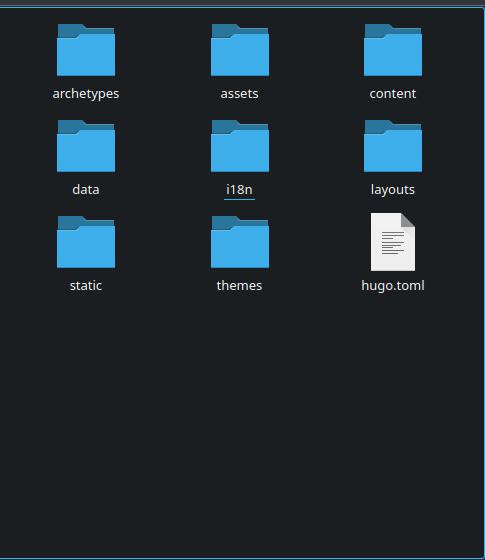 For the purpose of this, all you need to worry about is the content, static,
and archetype directories. The archetypes directory is where the page templates
are stored, and the content and static directories are used as the root of the
website when you are linking and referencing other files on the site. But, what does that mean
really? Here’s an example to help explain what I mean.
For the purpose of this, all you need to worry about is the content, static,
and archetype directories. The archetypes directory is where the page templates
are stored, and the content and static directories are used as the root of the
website when you are linking and referencing other files on the site. But, what does that mean
really? Here’s an example to help explain what I mean.
Let’s say you had an image you put in the static directory, and a page file in the content directory, if we used the same root directory for the website as we use with the file system, we’d set the link to the image as

However, since Hugo treats them both as sort of a linked root directory when you run the site all you need to do is

It doesn’t change that much, but it is important to keep in mind. Given that I am still new to Hugo, keep in mind that everything here should be fact checked and is subject to change as I continue.
Along with the shared base directory that you have with content and static, Hugo will also keep files organized based on the subdirectories you have them stored in inside the content directory, it might do that with static too, I don’t know.
But how do you even add the pages anyways?
It’s very simple, just go ahead and run
Hugo new content new-file.md
This will use the default page style you have the archetype directory to build the new page based on the template. If you want to organize the files based on what they’re for, for example blog posts, you can run
Hugo new content posts/new-post.md
Not only will this add the new file into the post directory inside content, because of how Hugo uses the directories and templates, if you have a posts.md template file inside your archetype directory, the new file will be built based on that template instead of the default.
And it really is that simple. While the dev server is running any changes you make to your site files will be detected by the server, and it will automagically reload the site, letting you see the changes in real time! This is by no means a total guide for everything you need to know, and I expect I made a few mistakes that I will learn about eventually, so if you are interested in using huge I highly recommend visiting their site and reading the official docs and quickstart guide.